Home › Guides › On-Model Ring Photos
On-Model Ring Photos with AI — No Photoshoot
Put your ring on a model's hand — showing scale, band width, and how the stone catches light — from the product image you already have.
Install on the Shopify App Store
3 free images · no credit card · $39/mo for 150 images after · cancel anytime.
Why on-model ring photos convert better
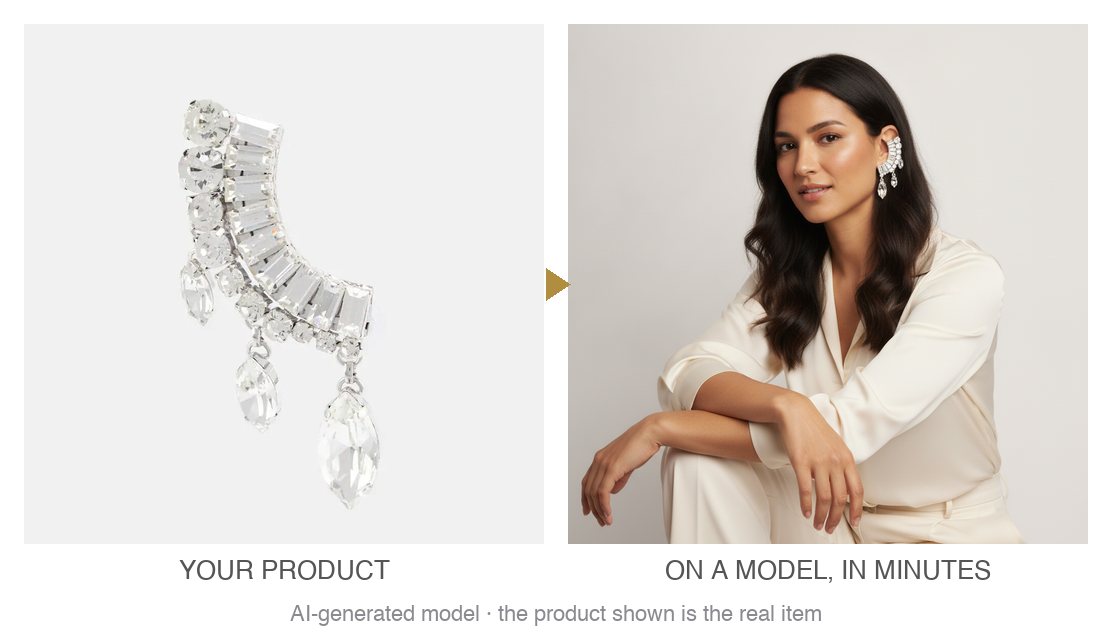
Ring buyers want to see the piece on a hand: how wide the band reads, how big the stone looks on a finger, how it pairs. A packshot can't show that. Vitrine places your exact ring — same setting, stone, and metal — on a model's hand, so the scale is honest and the image is your real SKU.
How it works
Vitrine reuses the product photos you already have. Select a product, pick one of several diverse AI models, and generate. You get a before/after in minutes; nothing publishes until you approve it, and you can regenerate as many times as you like.
- Pick the product in the Vitrine app inside your Shopify admin.
- Choose a model — one look, kept consistent across your catalog.
- Generate the on-model image on a model's hand.
- Review the before/after and publish to your product page.
Tip for the best result
A sharp top-down or angled packshot works best. One ring per image; a full set (ring + earrings) in a single photo can misplace pieces.
Faithful to the real piece
Vitrine is built for jewelry, not apparel — because faithful representation is the whole point. Every image is fidelity-checked so the rings on the model are the exact piece you sell. Images are AI-disclosed; the model is AI-generated, the jewelry is your real product.
FAQ
How do I show rings on a model without a photoshoot?
Install Vitrine on Shopify, pick the product, choose an AI model, and generate. Vitrine turns your existing rings product photo into a photoreal on-model image on a model's hand in minutes — no studio, model, or shoot. You review the before/after and publish only what you approve.
Will the on-model image match my actual rings?
Yes — every image is fidelity-checked to keep your exact piece (same stones, metal, and setting). It's your real SKU on a model, not a generic lookalike.
Are AI model photos allowed on my store and in ads?
On Shopify, AI on-model photos are allowed. Vitrine marks images as AI-generated (the jewelry is your real product) so you can use them on your product pages and in ads on Meta, Instagram, and TikTok.
How much does it cost?
3 free images to start (no credit card), then $39/month for 150 on-model images with unlimited regenerations. Cancel anytime.
Install on the Shopify App Store
3 free images · no credit card · $39/mo for 150 images after · cancel anytime.