Home › Guides › On-model jewelry photos without a photoshoot
On-Model Jewelry Photos Without a Photoshoot
Model photography sells jewelry — but a studio shoot per SKU is slow and expensive. Here's how to get photoreal on-model images from the product photos you already have, using AI.
Install on the Shopify App Store
3 free images · no credit card · $39/mo for 150 images after · cancel anytime.
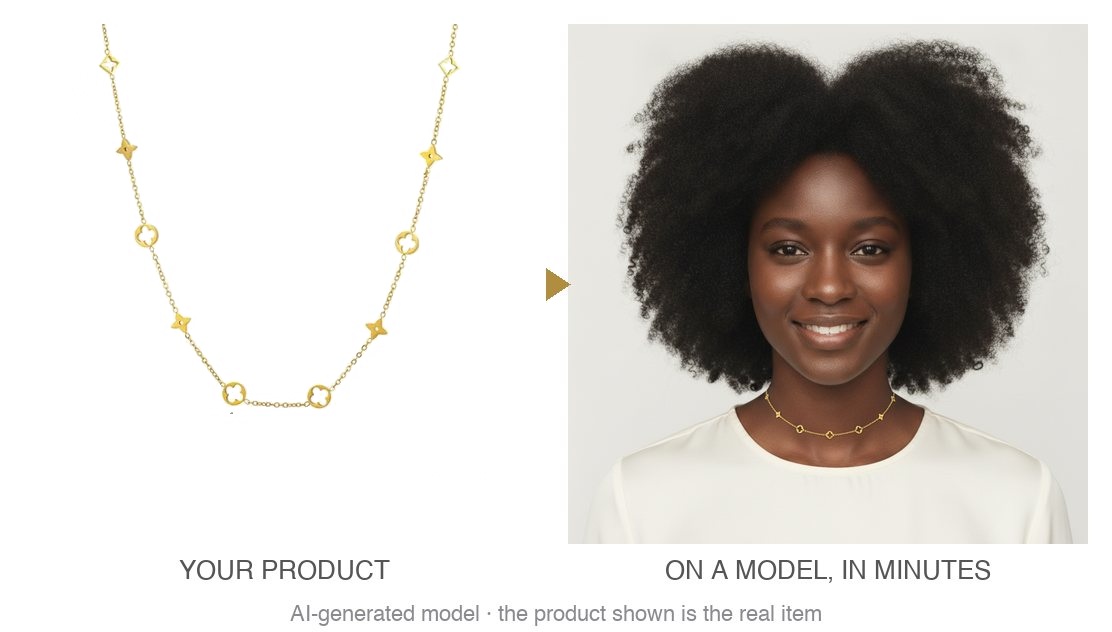
Why on-model photos matter for jewelry
Shoppers can't try jewelry on through a screen. A flat packshot on white hides scale, drape, and how a piece sits on the body — the exact things that drive a purchase. An on-model image answers them instantly, which lifts click-through and conversion, the levers that also drive product ranking and ad performance.
The old way vs. AI
A traditional shoot means booking a model, a studio, and a stylist, then re-shooting every time you add a SKU or refresh creative. A single Fiverr gig is one image, one wait, one re-brief per product. Neither scales to a full catalog.
AI on-model tools change the math: you reuse the photos you already have, generate on demand, and pay a flat monthly rate instead of per shoot.
How to do it with Vitrine
- Install Vitrine from the Shopify App Store.
- Pick a product from your catalog inside the app.
- Choose an AI model — one look, kept consistent across your store.
- Generate the on-model image and review the before/after.
- Publish to your product page — nothing goes live until you approve it.
Keep it faithful to the real piece
The risk with generic AI is a pretty photo of the wrong product. Vitrine is jewelry-specific and fidelity-checks every image, so the piece on the model is your exact stones, metal, and setting. For the most faithful result, generate a single piece per image; a full set (say earrings + a ring) in one photo can misplace pieces. Images are AI-disclosed — the model is AI-generated, the jewelry is your real product.
By jewelry type
See type-specific guides for earrings, necklaces, rings, and bracelets.
FAQ
How can I get jewelry photos on a model without a photoshoot?
Use an AI on-model tool. Vitrine turns your existing jewelry product photos into photoreal on-model images — you pick a product, pick a model, and generate. No studio, model booking, or shoot; you review the before/after and publish what you approve.
Is it really my exact piece on the model?
Yes. Vitrine fidelity-checks every image so the jewelry keeps its exact stones, metal, and setting — it's your real SKU on a model, not a generic stand-in.
Can I use AI model photos on Shopify and in ads?
Yes. Shopify allows AI on-model photos. Vitrine discloses images as AI-generated (the jewelry is your real product), so they're safe on product pages and in Meta/Instagram/TikTok ads.
What does it cost, and is there a free trial?
3 free images to start with no credit card, then a flat $39/month for 150 on-model images with unlimited regenerations. Cancel anytime.
Does it work for a whole catalog?
Yes — that's the point. Generate on-model images for every SKU on demand instead of booking a shoot per product. Single pieces give the most faithful result; a mixed set in one photo can misplace pieces.
Install on the Shopify App Store
3 free images · no credit card · $39/mo for 150 images after · cancel anytime.